On-site management

Capture once in the field. The office reviews, it doesn't re-type.

Every record links back to one thing: BOQ item × location × date. A quantity reported on site moves progress, earned value, productivity and the next payment certificate, with the crew hours and materials behind it.

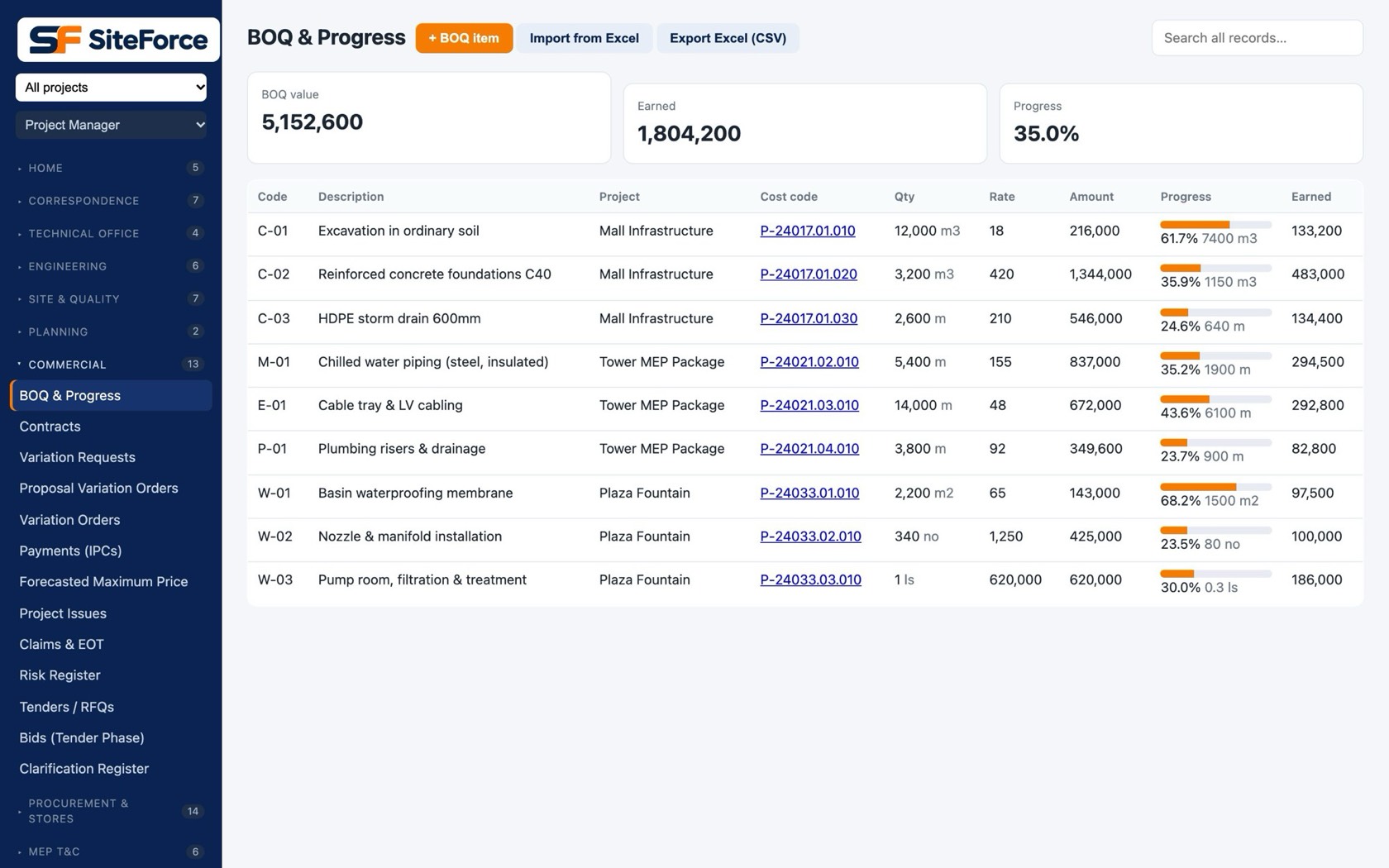
BOQ & Progress
BOQ and progress: quantities, done, value and progress per line
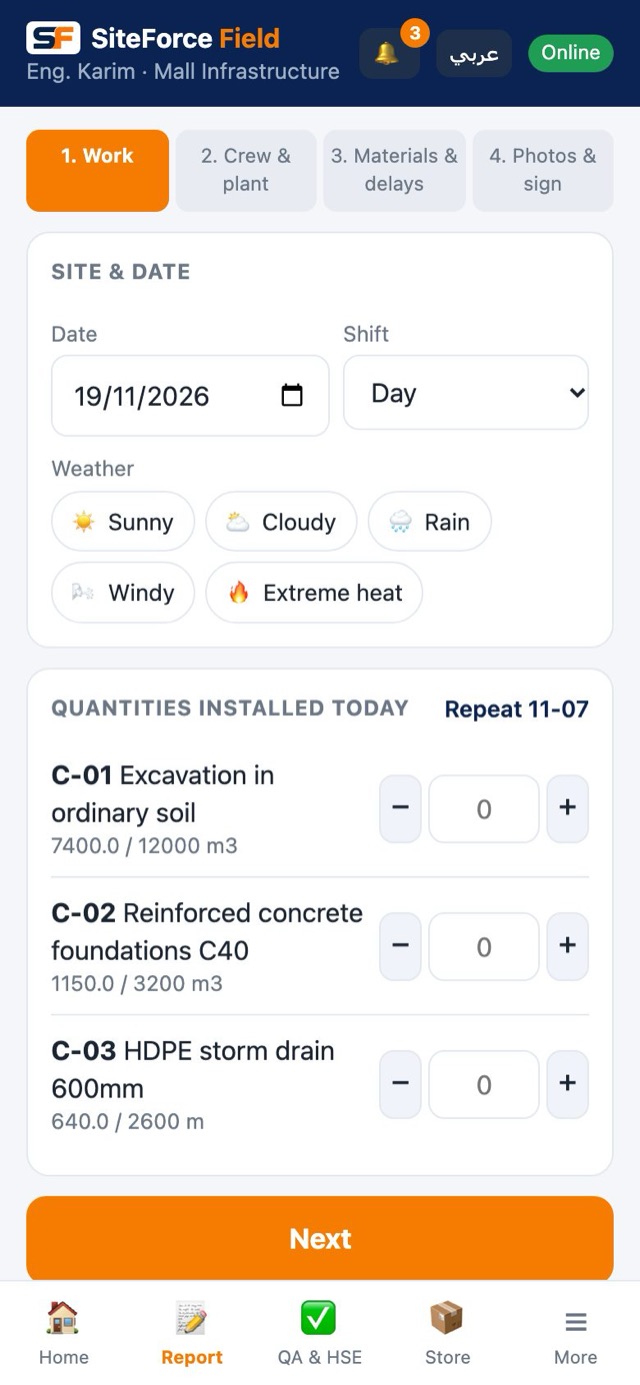
Field app daily report: quantities installed today

The field-to-office loop

Field app

Daily report

Quantities per BOQ line, crew hours, equipment, photos, GPS, checklist, signature. Offline.

Office

One approval

The engineer approves the report through its workflow, with comments instead of re-typing.

Automatically

Progress & cost

BOQ progress, earned value, productivity factor and early warnings update.

Commercial

Payment certificate

The IPC starts from approved quantities, ready for the client's format.

account_tree

Projects & BOQ

The base every client gets: projects, BOQ, zones and the correspondence around them.

upload_file

BOQ importBring the tender BOQ from Excel; lines, units and rates mapped once.

grid_view

Zones & buildingsEvery quantity, snag and job tied to where it happened.

dashboard

Portfolio dashboardAll projects, progress and warnings in one view, across every client portal.

mail

Letters, memos, meetingsCorrespondence with numbering, distribution lists and minutes.

alt_route

WorkflowsApproval steps per document type; ball-in-court always visible.

admin_panel_settings

Roles & privilegesMenus follow what each person may see; two-step sign-in.
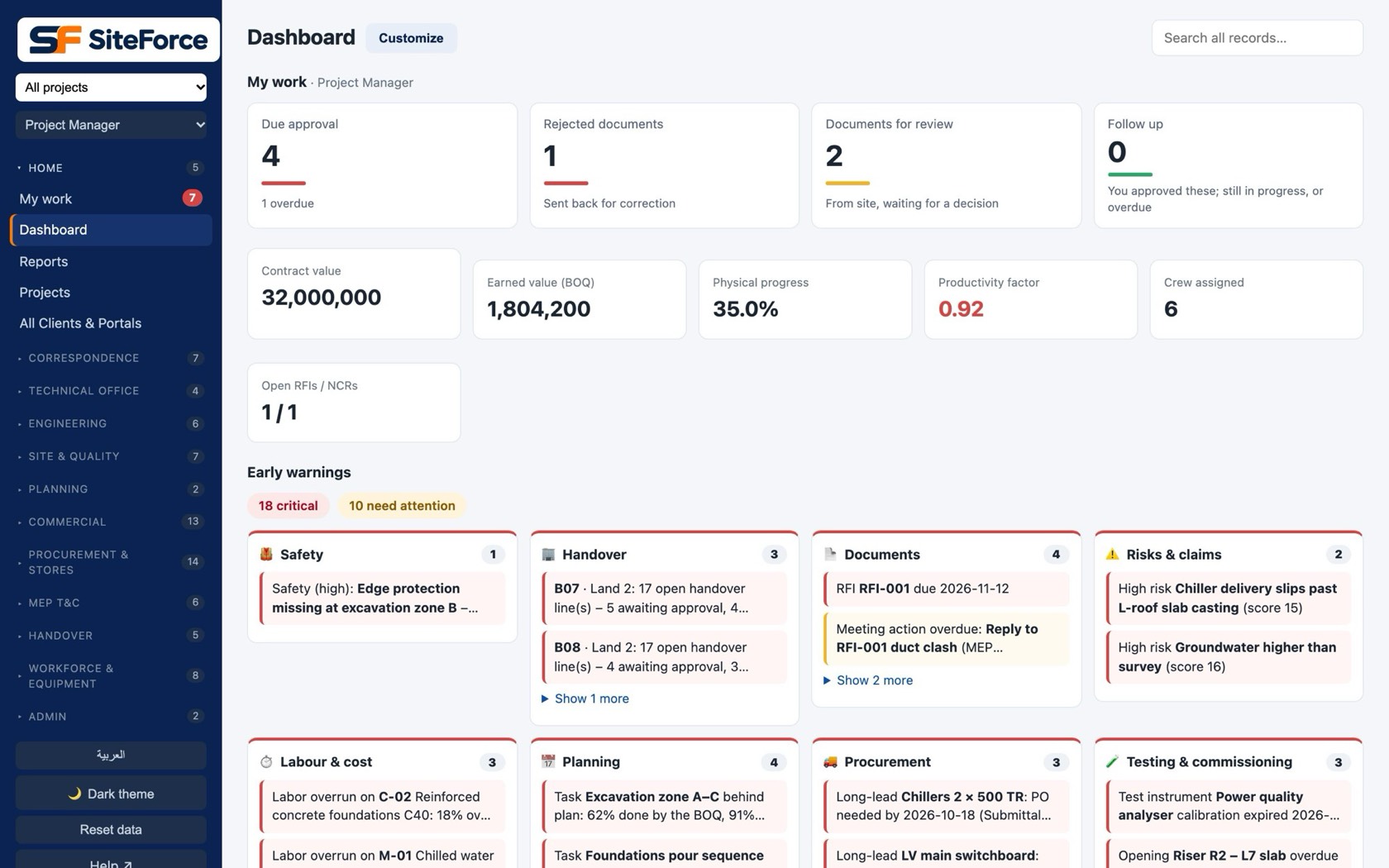
Dashboard
Dashboard with approvals and early warnings
folder_open

Document Control

The technical office, with a quality gate so packages go out right the first time.

help

RFIsRaised from site or office, answered and linked to the drawing.

fact_check

SubmittalsPre-submission checklist, rejection reasons, resubmissions tracked.

architecture

DrawingsRevisions, shop drawings, as-builts; available offline on the phone.

assignment

Site instructions & deviationsRecorded, priced and turned into variations when they change scope.

link

Client reference on every recordMap your number to the client's portal number and export packs in their format.

calculate

Design calculationsKept with the design they support.

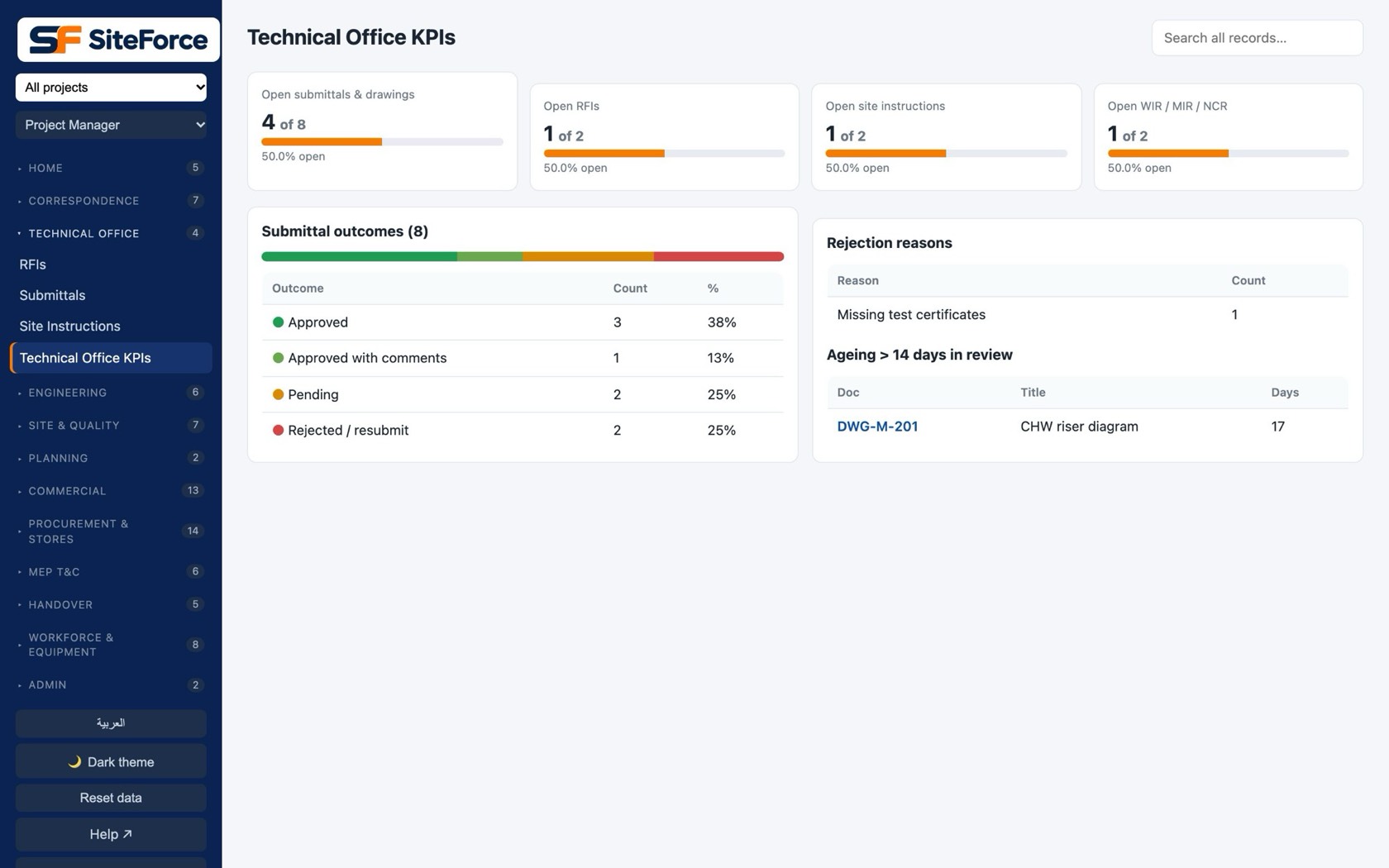
Technical office KPIs
Technical office KPIs: submittal outcomes, rejection reasons and ageing
construction

Site Reports & Quality

What happened today, and proof that it was done right.

description

Daily reportsUnder two minutes on the phone; voice fills it in Arabic or English.

task_alt

Site jobsAssign work to a foreman, follow it to done with photos.

search_check

Inspections & testsInspection requests, cube tests, flood tests, auto-graded results.

push_pin

Snags on the planPinned on the drawing; closed on site with before and after photos.

health_and_safety

HSE & NCRsSafety observations and non-conformances closed with proof.

photo_library

Site picturesEvery photo by date, zone and BOQ line, kept on the phone until synced.

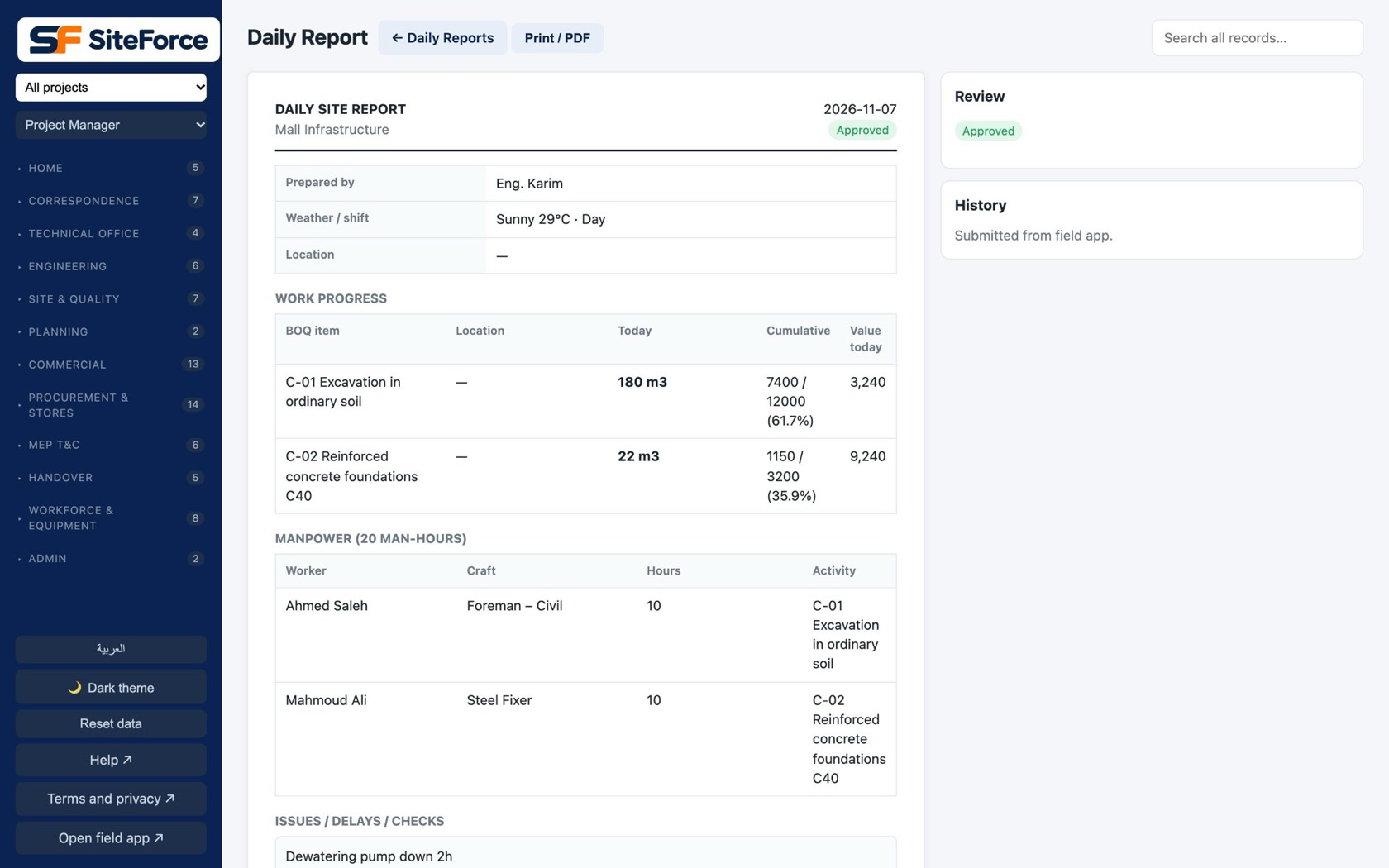
Daily report
Approved daily report with quantities, crew hours and checklist
calendar_month

Planning

A programme that moves with the site, not a file updated once a month.

view_timeline

Tasks & scheduleGantt view; task progress comes from the BOQ quantities reported.

flag

MilestonesContract dates and their status against the programme.

view_week

Takt planningTrade flow by zone for repetitive work.

warning

Early warningsSlipping tasks and low productivity flagged before the monthly report.

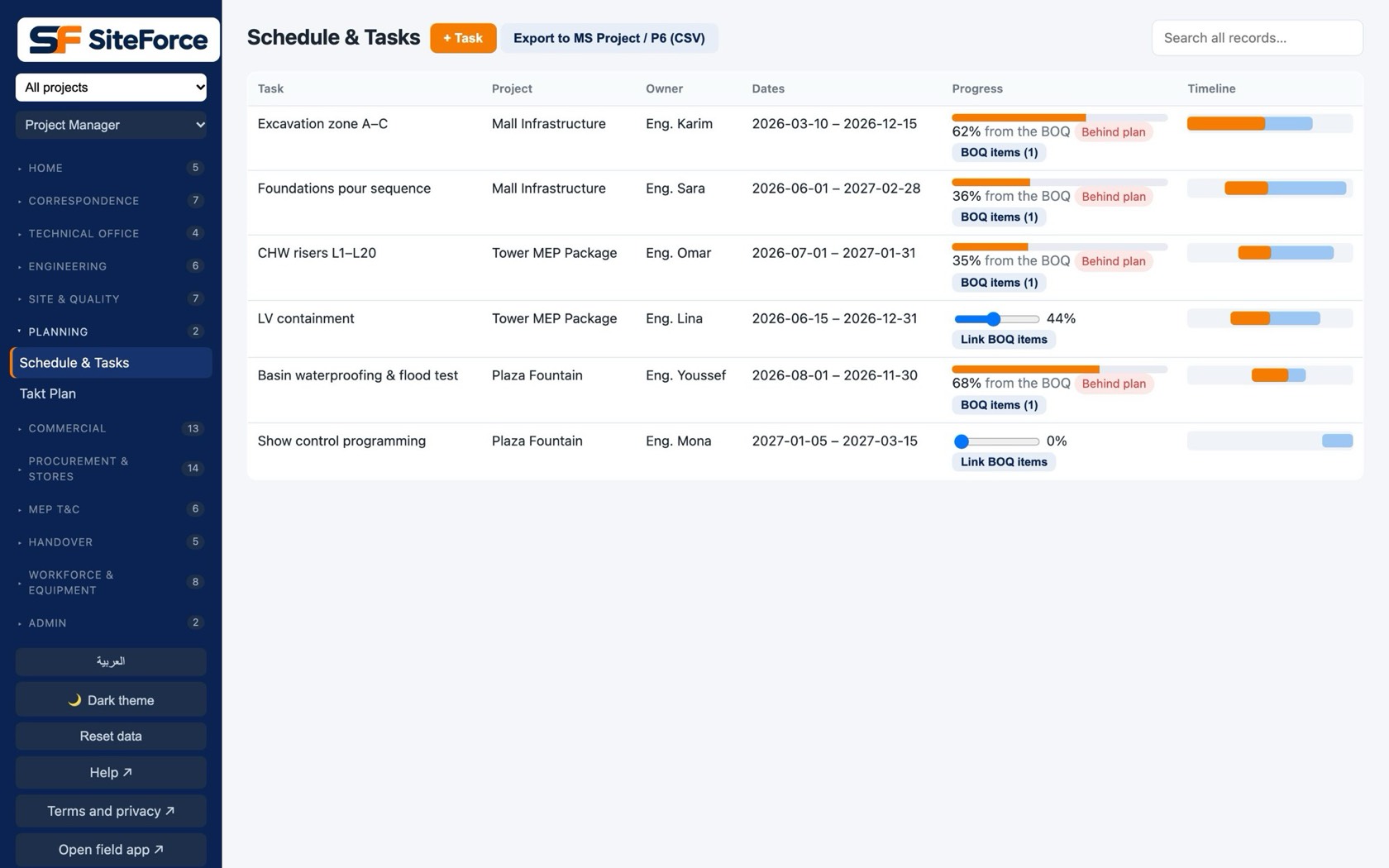
Schedule & tasks
Schedule with task progress from the BOQ
payments

Contracts & Commercial

Where the contractor's money is: certificates, variations and claims.

request_quote

Payment certificatesIPCs from approved quantities, retention and advance recovery, in local practice.

difference

VariationsRequests, priced variation orders, approvals and their effect on the contract.

gavel

Claims, risks & issuesLogged with the evidence from site records.

receipt_long

Invoices & e-invoicingInvoices prepared for the Egyptian Tax Authority system.

sell

Tenders & bidsBids, clarifications and the BOQ that becomes the project.

handshake

SubcontractsScopes, measured works and subcontractor certificates.

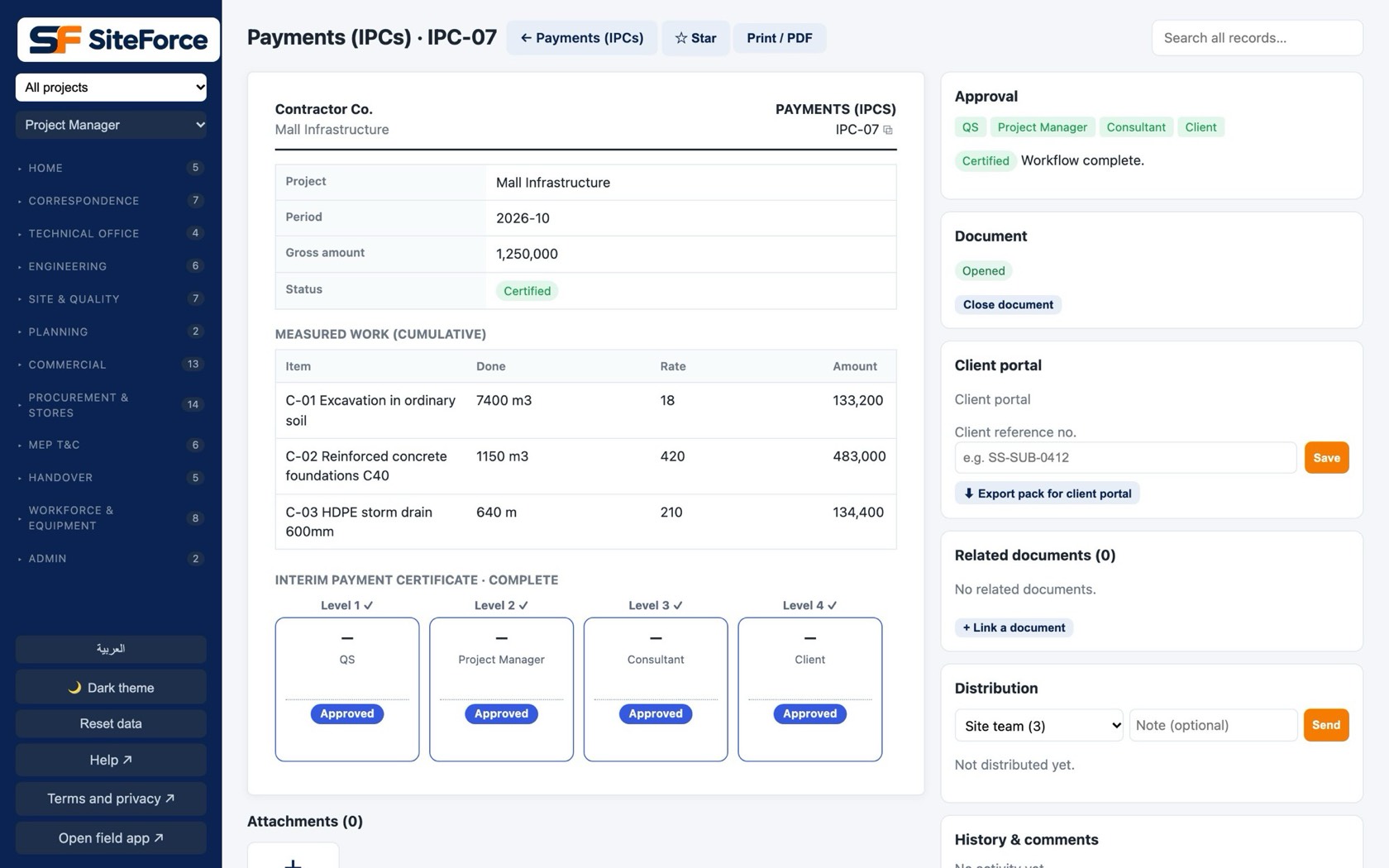
Payments · IPC
Interim payment certificate with approval steps
inventory_2

Procurement & Inventory

From the take-off to the site store, with prices that are current.

list_alt

Material lists & requestsTake-off per BOQ line; site requests what it needs.

shopping_cart

Purchase ordersFrom approved requests, compared across suppliers.

storefront

Supplier portalSuppliers keep their own prices and lead times; a weekly price board.

local_shipping

DeliveriesReceived into the site store against the PO.

warehouse

Stores & stockCentral and site stores, issues against BOQ, stock counts, wastage.

savings

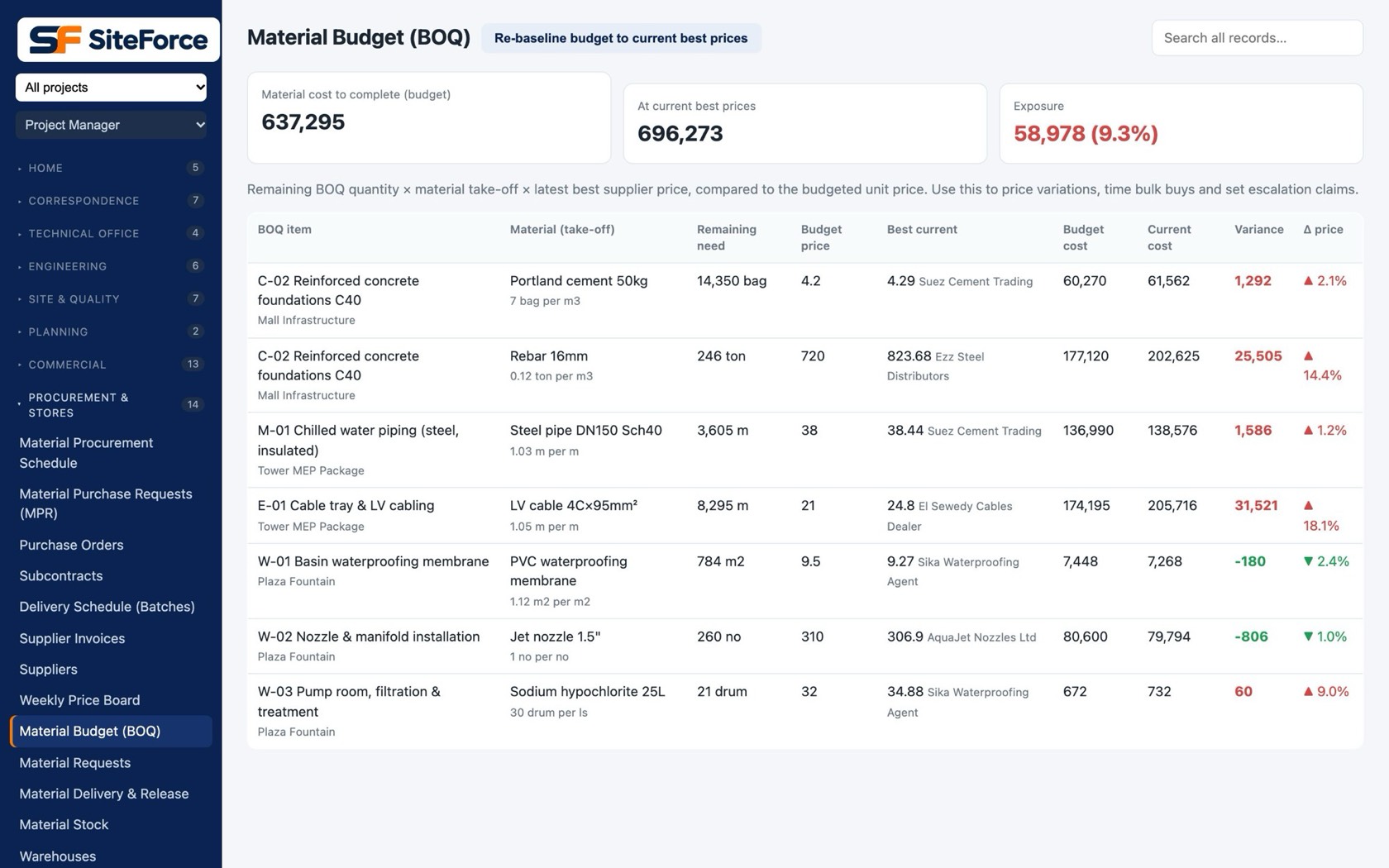
Material budgetTake-off × live price, against what has been spent.

Material budget
Material budget from the take-off and live supplier prices
groups

Workforce & Equipment

The labour discipline of a self-perform contractor.

badge

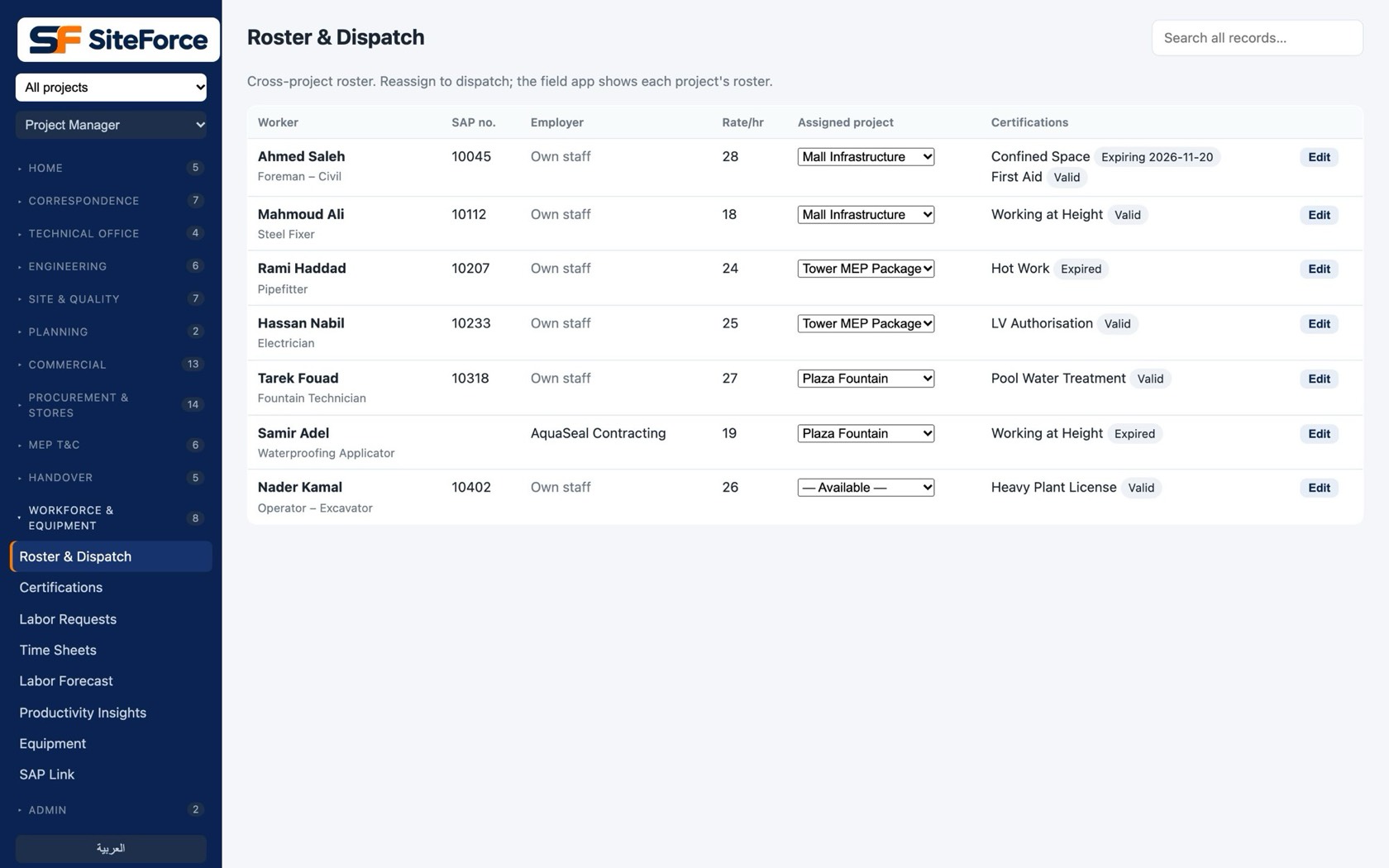
Roster & certificationsWho is where, with expiring certificates flagged.

person_add

Labour requestsForemen ask for crew; the coordinator fills from the roster.

schedule

TimesheetsHours per worker per activity from the daily report.

speed

Productivity & forecastUnit rates against plan; labour needed for the weeks ahead.

agriculture

EquipmentPlant and tools, hours, location and cost to the project.

Roster & dispatch
Workforce roster with crafts, projects and certificates
sync_alt

SAP Link

For contractors whose payroll and HR already live in SAP.

upload

Hours to SAPHours per activity exported in CATS format.

download

Workers from SAPImport the workforce instead of keeping two lists.

rule

ReconciliationHours report and differences between the two systems.

electrical_services

MEP Testing & Commissioning

Systems tested, recorded and ready to hand over.

hub

SystemsEach MEP system with its test sheets and status.

description

Method statements (RAMS)Approved before the work or the test starts.

straighten

InstrumentsTest equipment and calibration dates.

key

Permits to workSigned on the phone before the task can begin.

home_repair_service

Builder's work (BWIC)Openings and sleeves coordinated with civil.

monitoring

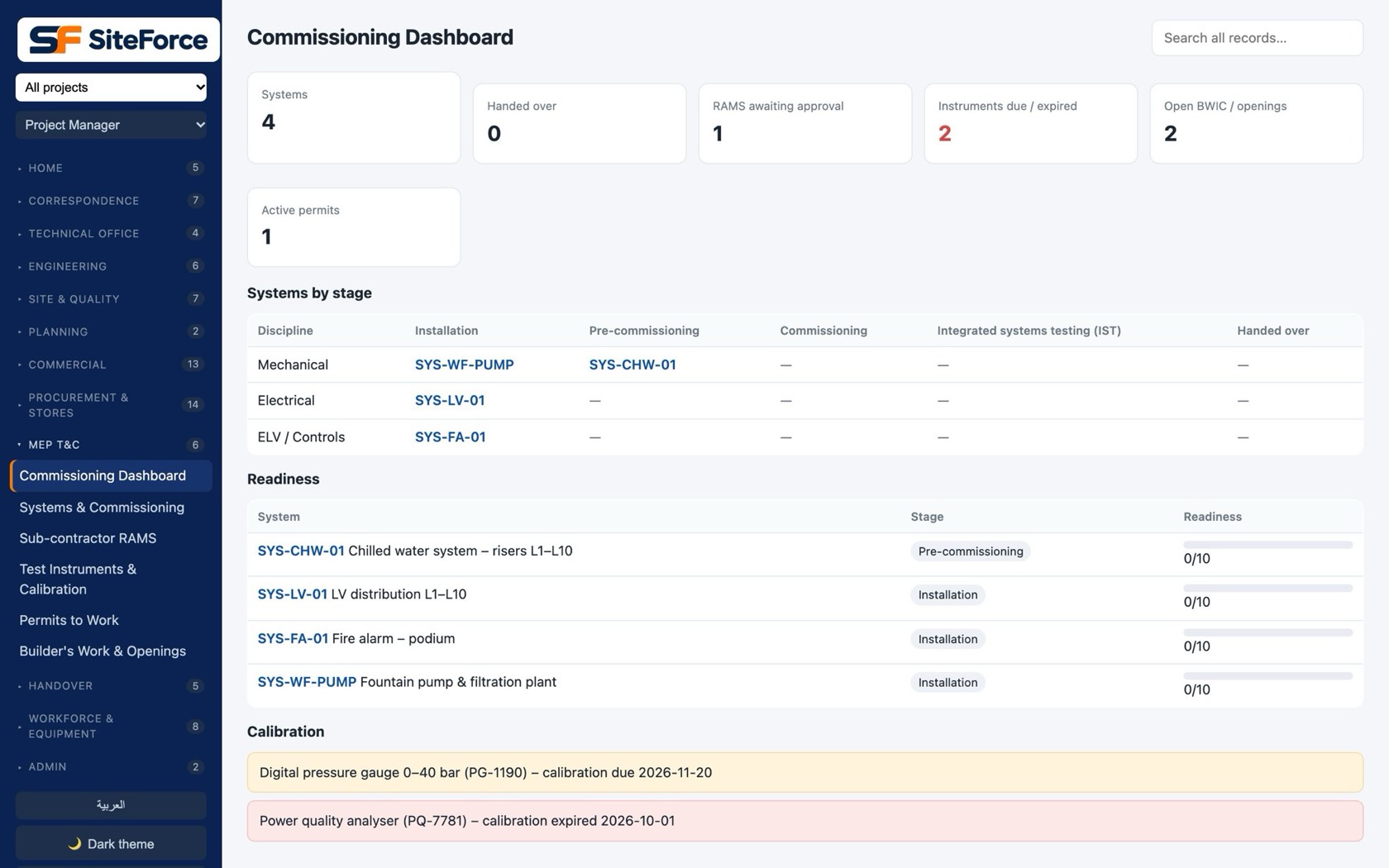
T&C dashboardWhat is tested, witnessed and outstanding per system.

Commissioning dashboard
Commissioning dashboard by system
key

Handover

The bridge to facility management.

checklist

Handover checklistsTemplates per unit or building, checked on site.

palette

Client selectionsFinishes and options chosen by buyers, tracked to installation.

domain_verification

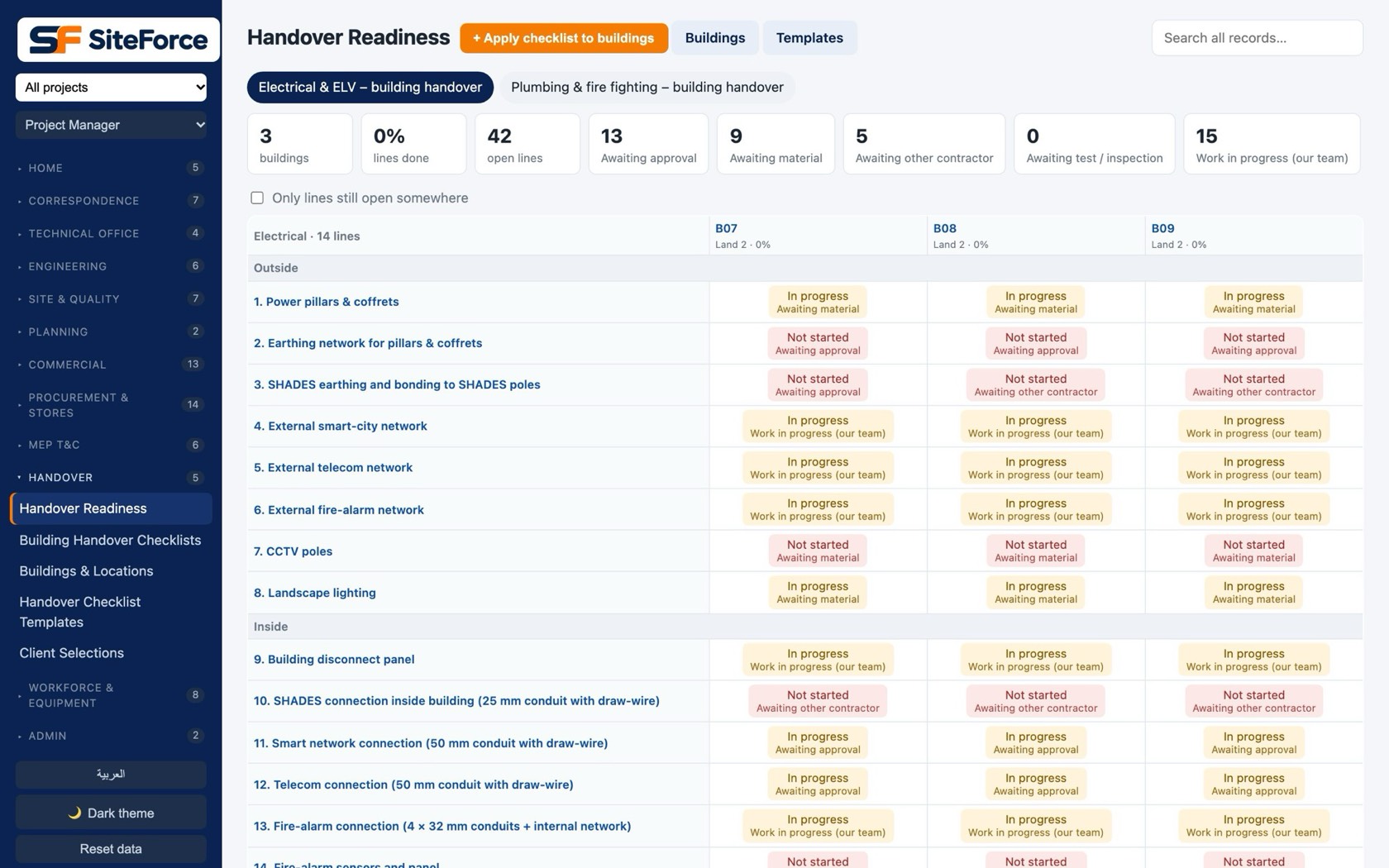
ReadinessWhich buildings and units are ready, and what blocks the rest.

arrow_forward

Straight into FMSystems become assets; open snags become defects-period work orders. See FM

Handover readiness
Handover readiness per building and unit
devices

The apps

Three ways in, one set of data.

computer

Web platformFor the office, the technical office, QS and management. Arabic and English.

phone_iphone

Field app (iPhone and Android)Reports, approvals, snags, jobs, drawings, checklists. Offline, voice, push.

storefront

Supplier portalSuppliers update prices and confirm orders without a full account.

lock

SecurityPrivileges per role, two-step sign-in, a security review before launch.

Buy the modules you need.

Start with Projects, Documents and Site; add Commercial, Procurement, Workforce, MEP and Handover as you grow.

eventBook a demoCompare